
Multiple Masking Path Services for Separate Editable Layers
We expertly separate complex images with multiple subjects or colors—giving you full control for edits like color correction, shadows, and retouching. Clean, flexible, and ready for high-end results.
Happy Clients
Completed Projects
Years of Experience
Services Include

Precision Edits with Masking Path
Sometimes a photo needs more than just a quick fix. Maybe you want to enhance a specific color, swap out a shirt shade, or add a lush green view through the window. Or maybe it’s about fine-tuning shadows, adjusting highlights, or isolating different elements for a cleaner, more professional look.
That’s where our Masking Path service comes in. We carefully separate each part of your image—so you can control colors, lighting, and backgrounds with total flexibility. Whether it’s for fashion, product photography, interior shots, or creative projects, we help you bring your vision to life, one detail at a time.
Real Estate Interior Masking Path
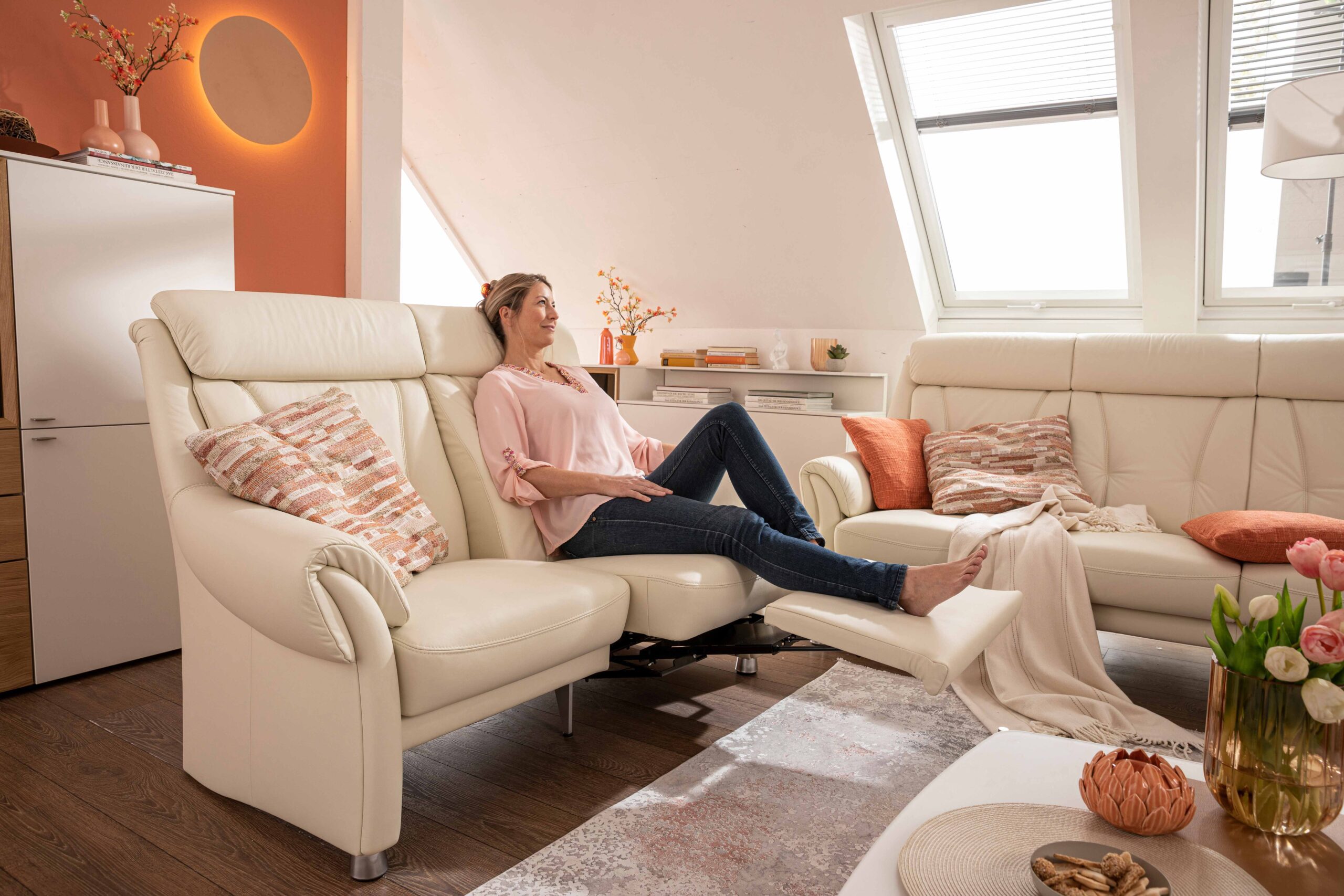
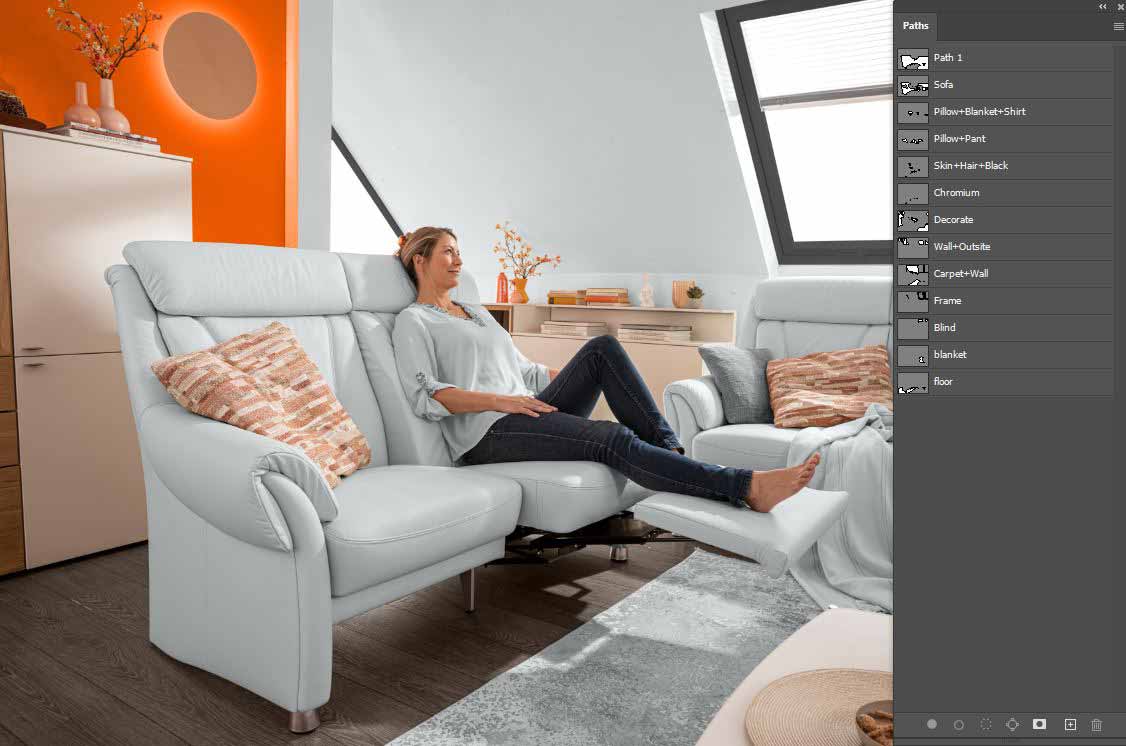
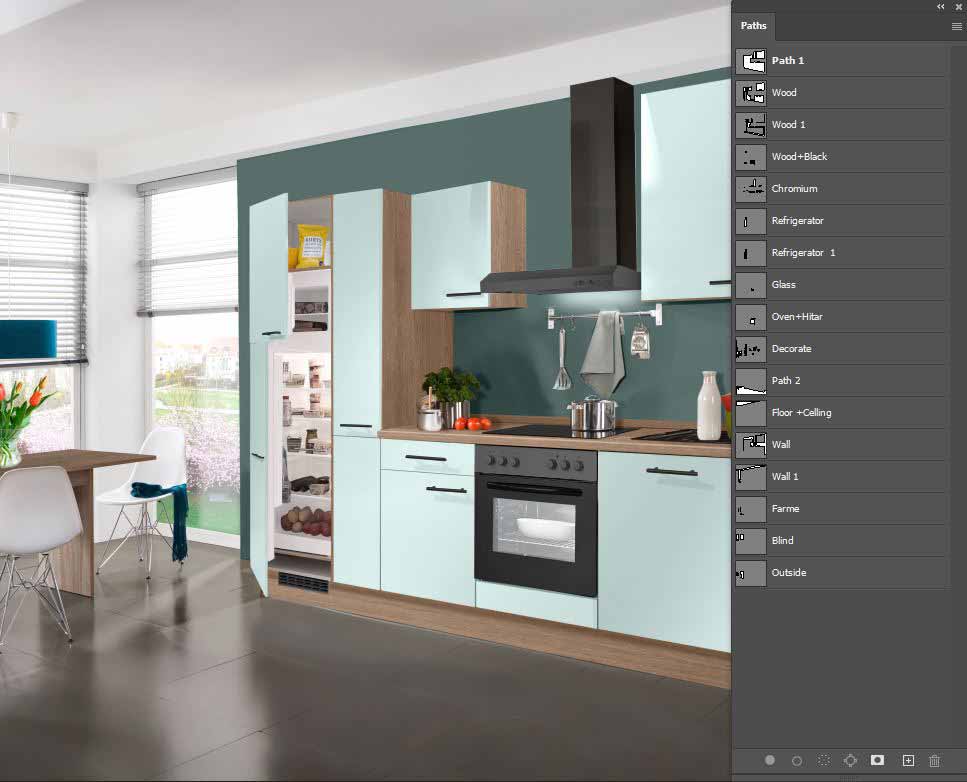
Interior spaces are full of visual elements—walls, furniture, decor, lighting, and window views—that all contribute to the mood of a room. Our Masking Path service allows you to isolate and edit each of these components with precision.
Want to change the wall color, enhance the couch fabric, or add a lush garden view through the window? We make it possible. Perfect for real estate listings, interior design portfolios, or renovation showcases, our edits help rooms feel more inviting, styled, and ready to impress potential buyers or clients.

Detailed Clipping Path for Real Estate Visuals
Real estate photos often contain a mix of architectural elements, furniture, lighting, and outdoor views—all needing individual attention to truly stand out. With our Masking Path service, we isolate each component so you can fine-tune colors, adjust shadows, replace backgrounds, or enhance specific areas with precision.
Whether you’re showcasing a cozy interior or a striking exterior, we help you create clean, professional visuals that highlight the best features of every property. Perfect for listings, brochures, or design portfolios that demand a polished and inviting look.
Food Image Masking Path
Food photography is all about capturing flavor, texture, and freshness—but sometimes, the background or lighting can get in the way. With our Masking Path service, we isolate individual elements like plates, garnishes, utensils, and even steam or sauce details, allowing for precise color correction, background changes, and lighting adjustments.
Whether you’re creating visuals for restaurant menus, food delivery platforms, cookbooks, or social media, we make sure every ingredient looks mouthwatering and professionally styled. From subtle enhancements to bold edits, we help your food photos stand out and tell a delicious story.


Product Image Masking Path
In eCommerce, presentation is everything. Our Masking Path service lets you take full control of your product images by separating different components—labels, textures, shadows, and packaging—so each part can be edited individually.
Need to change the color of a specific section, adjust lighting, or swap backgrounds for different platforms? We’ve got you covered. Whether you’re selling electronics, fashion, cosmetics, or home goods, we help your products look clean, consistent, and ready to convert browsers into buyers.
Isolating Every Detail, Telling Your Product’s Story
We hand-trace every shape — separating each element, cleaning every edge — so your images look crisp, clear, and ready to shine. From complex objects to grouped items, we turn raw shots into polished visuals that speak quality.
Disclaimer: The before/after photos are used as a sample of services we offer. The actual price of displayed images might be higher than the mentioned Starting Price. For accurate prices, please Request a Quotet
Frequently Asked Questions (FAQs)
A: Great question! A “clipping path” is a vector outline we draw around an object so we can isolate it — remove background, change color, etc. When you use Masking Paths in one image, that means there are several distinct outlines to separate different parts of that image. For instance: a shirt with buttons, logos, or pockets. One path around the shirt body, another around the buttons or logo — so each part can be edited on its own.
A: Because it gives you more flexibility and control. Here’s why many clients prefer multi-paths:
- You can edit different parts independently (change button color, adjust logo brightness, etc.) without touching the rest.
- If you offer variations (e.g. different collar colors, strap styles), multi-paths make switching easier.
- Complex images with overlapping parts or interior edges (holes, cutouts) benefit a lot.
- Later edits become simpler — instead of redoing everything, you just tweak the part you want.
A: Usually images that:
- Have more than one object or section you want to control separately (buttons, logos, straps, pockets).
- Include interior / exterior edges (holes, cut-outs, overlapping layers).
- Need color variants, part swaps, or special effects on certain parts.
- If your image is simple (one object, single shape), a single clipping path might be enough — but when you want detail, multi paths shine.
A: The clearer your instructions, the better your result. Helpful things include:
- High resolution, sharp images (less blur, good lighting)
- Alternative angles or close-up shots for parts that overlap or are hidden
- A list of which parts you want separated (collar, logo, background, etc.)
- Preferred output (JPG, PNG, PSD with separate layers) and whether you want shadows or reflections
A: You’ll get images where each path is separate or layered, so you can tweak or use parts individually. Depending on what you choose:
- Transparent background or solid color
- Layered files (PSD / TIFF) with different parts on separate layers
- Clean, precise edges (even inside cut-outs, holes)
- Optional shadows, reflections, color corrections per part
A: Turnaround depends on number of images, how complex they are, and how many paths each image needs. Rough estimates:
- Simpler multi-path jobs: around 24 hours
- Bigger batches or very complex work: 1–2 days or longer
- Need it fast? I offer express delivery — just let me know in advance
A: My pricing is based on:
- How many images
- How many paths per image (more paths = more time)
- Complexity of each path (smooth curves vs many small holes)
- Turnaround time you need
- Extra requirements (layered files, shadows, special formats)
If you send samples and your wish list, I’ll give you a clear quote so you know exactly what to expect.
A: Absolutely fine — revisions are part of how I work. If something seems off (edges aren’t clean, separation isn’t perfect, parts look a little wrong), tell me exactly what you see, and I’ll adjust it. For changes within the original scope, there’s no extra cost. If you want something totally new, we’ll chat what’s reasonable.
A: Yes — even multi clipping paths have their boundaries:
- Very low-quality or heavily blurred images: detail may be lost and hard to recover
- Extremely fine or delicate parts (thin threads, very tiny curves) are trickier to isolate cleanly
- Uneven lighting or color cast differences across parts can make matching difficult
- If you don’t provide references or insert shots for hidden parts, I may need to guess or reconstruct — which may slightly affect accuracy
A: Because I try to bring things to you that many providers skip:
- Precision: I draw paths carefully and thoughtfully (inside & outside edges)
- Clarity & communication: I keep you in the loop — so we’re on the same page about what you want
- Flexibility: I can give you layered files so you can change backgrounds, colors, parts later
- Reliability & quality: On-time delivery, consistent quality, and revisions until you’re happy
Need Accurate Pricing? Send Us a Quote Request
We Usually Reply Within 30 Minutes
By submitting Quote you are automatically agreeing with our Terms and Conditions and Privacy Policy

